// for TSA’s cybersecurity directives
Every requirement in your TSA directives, on one timeline.
A guided workbook for the TSA cybersecurity Security Directives for pipeline, freight rail and passenger rail. It maps each requirement, runs your yearly cycle, keeps your evidence together, and drafts submissions a reviewer can check line by line. Offline, and encrypted on your own computer.
- Evaluate now
- Purchase opens later
- Pipeline · Freight rail · Passenger rail
- 565directive paragraphs, each accounted for
- 5directives, at the revision followed
- 56plain-language requirements
- 19plans, notices and records drafted
// who it’s for
Owners and operators TSA has notified.
Built for Cybersecurity Coordinators, OT security leads and compliance managers.
- SD Pipeline-2021-01 & -02Critical pipeline systems and facilities
- SD 1580-21-01Freight rail
- SD 1582-21-01Passenger rail and rail transit
- SD 1580/82-2022-01Rail cybersecurity mitigation actions and testing
// what it does
The whole directive cycle, in one place.
From mapping each requirement to the submissions and records TSA expects, year after year.
- 01
Maps every requirement
Select your directives. Each requirement in plain language with its paragraph, labeled Required, Guidance or Option.
- 02
Accounts for every paragraph
All 565 paragraphs mapped or listed with the reason they need no action, checked every build.
- 03
Runs your yearly cycle
Assessment Plan update and report, architecture reviews, three-year measure assessment, annual exercises, amendment deadlines.
- 04
7 ready-made forms and logs
From access reviews to patch deferrals and backup restoration tests, pre-filled. Other forms are built into the documents they belong to.
- 05
Keeps records ready for TSA
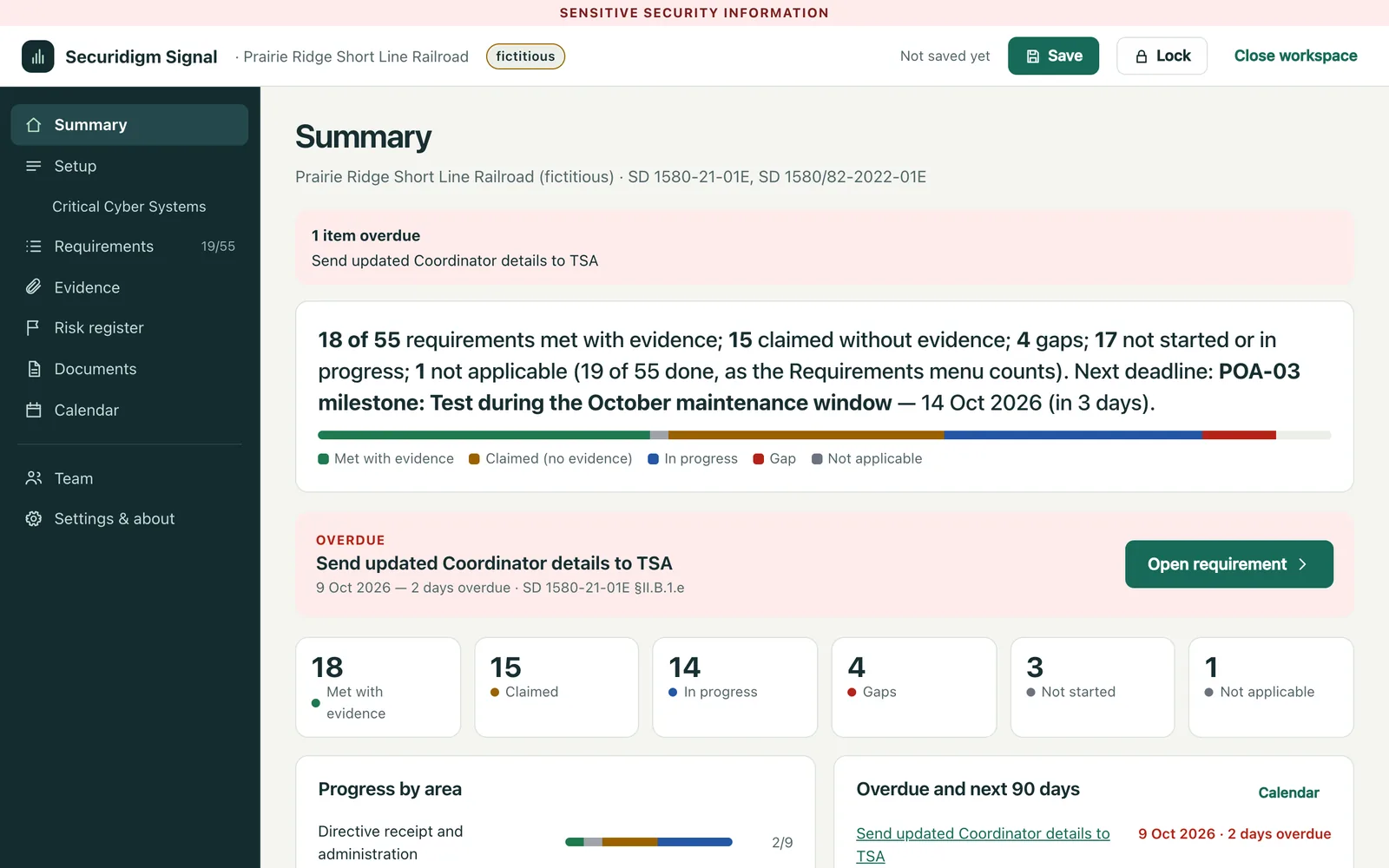
Documents cite evidence by name; the app flags missing evidence, overdue items and changed files.
- 06
Tells you where you stand
A Critical Cyber Systems register and a plan of action where every gap gets an owner, milestones and a due date.
- 07
Incident reporting at hand
The 72-hour CISA reporting steps from your directives, with a pre-filled worksheet and call sheet.
- 08
Keeps up with revisions
Each update shows which revision it follows and TSA’s summary of what changed. Updates are designed to open your existing workspace files.
- 09
Several contributors
Send colleagues encrypted packets of assigned requirements; accept or reject each answer, with a full change log.
plans, notices and records, built from your answers.
SSI markings applied automatically.
- Cybersecurity Implementation Plan
- CIP amendment requests
- Assessment Plan update, 3-year schedule
- Assessment Plan annual report
- Coordinator notices
- Incident response plans and exercise records
- Records package for inspection
- Remediation plan
- Architecture design review summary
- Notices for less common cases
 Video demo · 11 min 35 s (opens YouTube in a new tab)
// see it work
The whole app in under 12 minutes.
A narrated walkthrough with a fictitious railroad: setup, requirements, Critical Cyber Systems, the plan of action, the calendar, and the documents Signal drafts, from the Implementation Plan to the incident worksheet.
// local by design
Your data stays with you.
Your Implementation Plan, Assessment Plan, reports and results are Sensitive Security Information under 49 CFR Part 1520. The app keeps them off anyone else’s servers, including ours.
One file, no install
Chrome, Edge, Firefox or Safari on a Mac (Windows testing comes before release).
No internet connection
A browser security policy blocks all outside connections. Your security team can check it.
Encrypted with your password
AES-256, using your browser’s built-in cryptography.
Your files, your folder
Saved encrypted where you choose (in Firefox and Safari, saving downloads them). Exports carry the SSI marking.
Verifiable
Each release will come with a published SHA-256 fingerprint.
Only you hold the key
We cannot recover a lost password. Keep it somewhere safe.
// plainly
What it is not.
- Not approval. TSA decides whether your measures meet the directives.
- Not a replacement for your Coordinator or security team. They decide how each requirement is met.
- Not legal advice, and Securidigm doesn’t represent you before TSA.
- Not a security tool. It doesn’t scan, test or change your systems.
- Not a cloud service. No account; nothing you enter is stored on our servers.
// two ways to work with us
The tool. The partner.
Your choice.
Run the software with your own team, or have Securidigm work beside you on the readiness work.
Your team runs it
Self-managed software
An app your team owns and runs, with your records kept under your control.
- A perpetual license for your organization, covering one mode: pipeline, or rail
- Guided work through every requirement, documents drafted from your answers
- First year of updates and email support included
- Optional yearly renewal after that
Securidigm works with you
Managed Readiness
A working partner beside your team, using the same software, with the scope agreed up front.
- Facilitated interviews and running the app with you
- Document preparation and evidence organization
- Action tracking and progress reviews
Quoted per engagement.
Discuss Managed ReadinessTechnical assessments, control implementation, exercises, onsite work, incident-response support and designated officer responsibilities may be scoped separately. Securidigm does not represent customers before TSA or the Coast Guard.
// availability
Evaluate now. Buy later.
Signal is built. Evaluate it for 14 days with a fictitious railroad or pipeline operator, or your own workspace. Purchase will include the first year of content updates and email support, with optional yearly renewal. A license covers one mode: pipeline, or rail (freight and passenger rail together).
How the evaluation works
- 01Request an evaluation and we email you a personal link.
- 02Work through the app for 14 days, with the sample operator or your own workspace.
- 03When purchase opens, your saved workspace opens in the full, offline app.
Please don’t enter real Sensitive Security Information while you evaluate.
// questions
Frequently asked.
Does using this make us compliant?
No tool can do that on its own. The app maps every requirement, organizes your evidence, drafts your documents and shows what’s missing. TSA decides whether your measures meet the directives.
We already have an approved Implementation Plan. Why do we need this?
The directives don’t stop at approval. They require an Assessment Plan update and report every year, architecture reviews, assessment of every measure over three years, annual exercises, timely amendments, and records ready for TSA. The app runs that cycle.
What happens when TSA issues a new revision?
The first year of updates is included, then optional yearly renewal. Each release shows which revision it follows and TSA’s summary of what changed.
We run a pipeline and a railroad. Is that one license?
No. A Signal license covers one mode: pipeline, or rail (freight and passenger rail together). Each mode has its own workspace and license. While you evaluate, you can try either mode.
Does it replace our OT security tools?
No. It manages the requirements, documents and evidence. Your monitoring, detection and segmentation tools do the technical work, and their outputs become your evidence.
How is this different from CISA’s CSET?
CSET scores your answers and reports deficiencies. Signal runs the directives’ ongoing cycle and drafts the documents and records TSA expects. Use CSET to check your measures, and Signal to document them.