// for 33 CFR Part 101, Subpart F
Your Coast Guard cybersecurity plan, done step by step.
A guided workbook for the Coast Guard’s maritime cybersecurity rule. It walks you through every requirement in plain language, keeps your evidence organized, and drafts the assessment, plan and records you need. Nothing to install, no internet connection, and your work stays encrypted on your own computer.
- Reservations open
- Assessment & plan due July 16, 2027
- App target: March 1, 2027
- 172paragraphs of Subpart F, each accounted for
- 14Cybersecurity Plan sections, 101.630(c)
- 24documents drafted from your answers
- 26forms and logs, pre-filled
// who it’s for
Built for your operation.
- Owners and operators of U.S.-flagged vessels, facilities and OCS facilities with a security plan under 33 CFR parts 104, 105 or 106.
- Cybersecurity Officers (CySOs), whether in-house or outsourced.
- Facility, vessel and company security officers who have been handed the cyber rule.
- Companies with one site or a whole fleet, including common plans covering similar vessels or facilities.
// what it does
Practical depth. Connected work.
From the first question to the documents you submit and the records you keep, in one offline workspace.
- 01
Walks you through every requirement
Plain-language steps beside the official text, with all 38 definitions from 101.615. Each item is labeled required by regulation or Coast Guard guidance.
- 02
Accounts for all of Subpart F
All 172 paragraphs mapped to a step or listed with the reason they need no action, checked every build. Mapped isn’t the same as met.
- 03
Shows what applies to you
Which vessels, facilities and OCS facilities the rule covers. Mark items not applicable with the reason, and filter by status.
- 04
Guides your Cybersecurity Assessment
Follows Policy Letter 01-26: necessary functions, asset inventory, threats and vulnerabilities, priority assets, Critical IT/OT.
- 05
Keeps the registers the rule expects
Approved hardware and software, asset inventory and network map, remote-OT justifications, compensating controls, third-party connections.
- 06
Keeps your evidence in order
Attach files to each requirement. Documents cite evidence by name, and the app flags evidence that’s missing or has changed.
- 07
Tells you where you stand
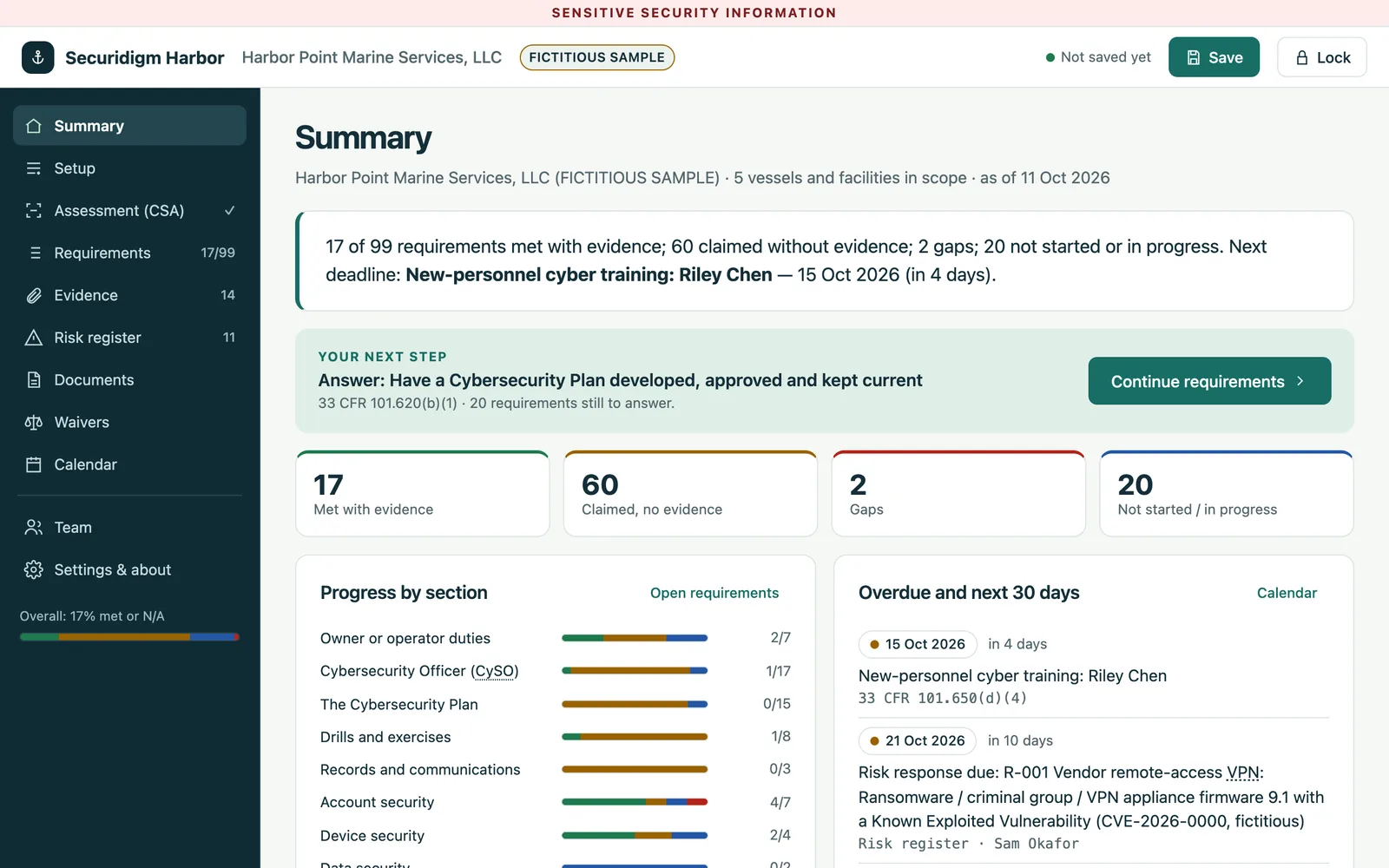
Done, only claimed, missing and due next. A risk register from your assessment feeds the plan’s unresolved-vulnerabilities section.
- 08
Tracks your deadlines
Annual assessment, audit and training, drills, exercises, the 5-year renewal, and the 96-hour and 30-day triggers. Export to Outlook, Google or Apple.
- 09
Lets your team contribute
Assign requirements to IT, engineering or security officers as encrypted packets. Accept or reject each answer; a change log records who changed what.
documents, drafted from your answers and evidence.
Organized by requirement, so a reviewer sees what’s covered and what isn’t. SSI markings applied automatically.
- Cybersecurity Assessment report
- Cybersecurity Plan, all 14 sections
- CySO designation letter
- Cyber Incident Response Plan
- Training, drill, exercise and audit records
- Waiver and equivalency requests
- Annual audit report and certification letter
- Plan amendment request and notices
- NRC incident worksheet, penetration-test letter
- Inspection readiness self-check
 Video demo · 11 min 47 s (opens YouTube in a new tab)
// see it work
The whole app in under 12 minutes.
A narrated walkthrough with a fictitious marine services company: setup, requirements, the assessment, the calendar, and every document Harbor drafts, including all 14 sections of the Cybersecurity Plan.
// local by design
Your data stays with you.
Your Cybersecurity Plan and Assessment are Sensitive Security Information under 49 CFR Part 1520. So we built the app to keep them off anyone else’s servers, including ours.
One file, no install
Chrome, Edge, Firefox or Safari on a Mac (Windows testing comes before release). Built for desktop screens.
No internet connection
A browser security policy blocks all outside connections. Your IT team can check it.
Encrypted with your password
AES-256, using your browser’s built-in cryptography.
Your files, your folder
Saved encrypted where you choose (in Firefox and Safari, saving downloads them). Printed documents carry the SSI marking; store them as SSI.
Verifiable
Each release will come with a published SHA-256 fingerprint.
Only you hold the key
We cannot recover a lost password. Keep it somewhere safe.
// plainly
What it is not.
- Not approval. The Coast Guard reviews and approves your plan; the app drafts it from your answers.
- Not a replacement for your CySO. Your Cybersecurity Officer still decides how each requirement is met.
- Not legal advice, and Securidigm doesn’t represent you before the Coast Guard.
- Not a security tool. It doesn’t scan, test or change your systems.
- Not a cloud service. No account; nothing you enter is stored on our servers.
// two ways to work with us
The tool. The partner.
Your choice.
Run the software with your own team, or have Securidigm work beside you on the readiness work.
Your team runs it
Self-managed software
An app your team owns and runs, with your records kept under your control.
- A perpetual license for your organization
- Guided work through every requirement, documents drafted from your answers
- First year of updates and email support included
- Optional yearly renewal after that
Securidigm works with you
Managed Readiness
A working partner beside your team, using the same software, with the scope agreed up front.
- Facilitated interviews and running the app with you
- Document preparation and evidence organization
- Action tracking and progress reviews
Quoted per engagement.
Discuss Managed ReadinessTechnical assessments, control implementation, exercises, onsite work, incident-response support and designated officer responsibilities may be scoped separately. Securidigm does not represent customers before TSA or the Coast Guard.
// availability
Reserve your license. No payment, no obligation.
One license covers all your vessels, facilities and OCS facilities, including those held by affiliated companies. Pricing is quoted for your organization.
- The app for all your sites, perpetual license
- First year of content updates and email support
- Optional yearly renewal after that
Founding customers: sign a letter of intent before release and your renewal price stays locked while you keep renewing (see the Terms, section 7). You can also ask to be considered for the pilot group.
// questions
Frequently asked.
Does using this make us compliant?
No tool can do that on its own. The app guides you through every requirement, drafts your documents and shows what’s still missing. You, your CySO and the Coast Guard decide whether your measures meet the rule.
How is this different from CISA’s CSET?
CSET asks questions, scores your answers and reports gaps. Harbor walks you through each Subpart F requirement and drafts the specific plan, assessment, training and incident records the rule asks for. Use CSET to assess, and Harbor to write up and keep the records.
We have a fleet of similar vessels. One plan or many?
Either. The rule allows one plan for similar vessels or facilities as long as it addresses each one’s specific risks. The app supports both.
How do we submit?
The Coast Guard receives plans and assessments as password-protected PDFs through DoD SAFE. The app prints each document to PDF, ends each plan with its certification letter, and shows a “How to send it” checklist beside the plan.
What if the rule changes?
The first year of updates is included. After that, updates are an optional yearly renewal. Each release shows the date its sources are current as of.
What if I forget my password?
We can’t recover it. Nobody else holds a copy of your key. That’s what keeps your data private.